CineBrain Pro brings exposure and spot readings, color references, a director’s viewfinder, distance and depth-of-field tools, sun planning and scout reports together on your iPhone. Built for cinematographers, directors and location scouts, with photography support also included.
From the light to the frame. From the frame to the plan.
Bring the functions of an exposure meter, spot meter, director’s viewfinder, color references and distance tools into one working space. Choose a setting, see how it relates to the other decisions and keep the references with your project.
01
Exposure Wheel & exposure reference
Bring the light reference and camera settings together. Use tactile rotating rings to explore T-stop, shutter angle, frame rate and EI.
Technical details
Cinema settings for T-stop, shutter angle, frame rate and EI.
A camera-based scene reference or a manually entered light value.
Setting EV, scene reference and the difference in stops.
ND and filter loss included in the exposure decision.
Exposure correction against your reference meter.
02
Spot exposure reference
Look at the surface you choose, rather than only the whole frame. Build an exposure decision around the relationship between a face, a window and the shadows.
Technical details
Tap the viewfinder to select a spot exposure reference.
Inspect the chosen surface’s EV reference.
Use “Expose for this point” to work from the selected area.
Tap different surfaces to meter their references one after another and compare them.
03
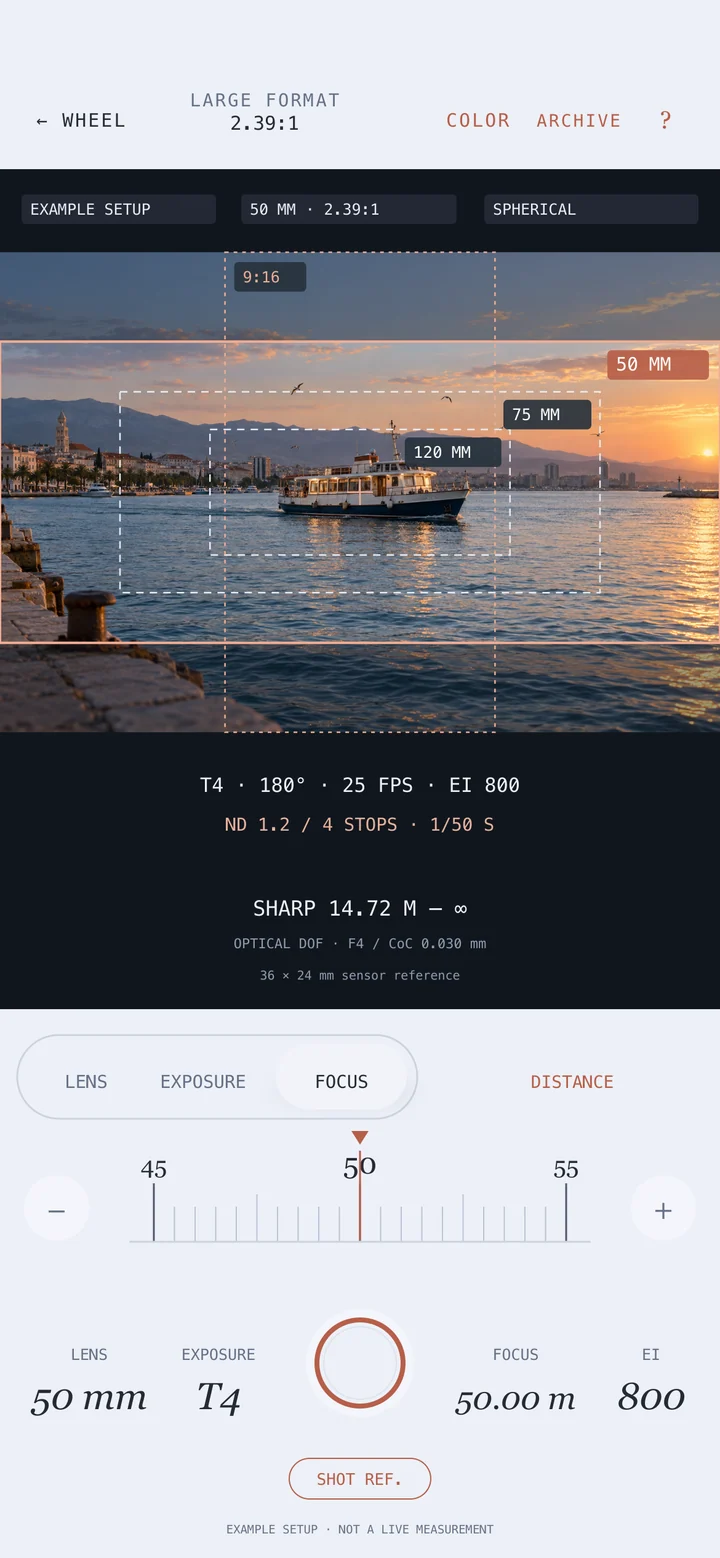
Director’s viewfinder
Explore the field of view before setting the camera. Use focal length, format, aspect ratio and protection guides to decide what the scene will reveal.
Technical details
Compare focal-length frames from the same camera position.
Super 16, Super 35, Large Format and 65 mm formats.
Spherical or 1.3×, 1.5×, 1.8× and 2× anamorphic framing calculations.
Up to two additional protection ratios and project framing defaults.
04
Kelvin, tint & gel calculations
Compare an approximate source color temperature with camera white balance. Consider changes to the light and changes to the camera as separate decisions.
Technical details
Approximate camera-based Kelvin/tint references, with measured, spot and manual source options.
Separate values for the light source and camera white balance.
Mired differences to evaluate the warming or cooling direction.
CTO/CTB, green–magenta and Rosco/LEE gel references.
Supported lens-filter alternatives and their exposure loss carried into the Exposure Wheel.
05
LiDAR, distance & depth of field
Connect subject distance with the focus plan. LiDAR on LiDAR models; an approximate depth estimate on dual-camera models; manual entry on other models.
Technical details
LiDAR on LiDAR models; an approximate depth estimate on dual-camera models; manual entry on other models.
Manual distance entry, an interactive ruler and metres/feet.
Distance offsets for the known difference between the phone and sensor plane.
Near and far depth-of-field limits, hyperfocal distance and a circle-of-confusion reference.
Horizontal field of view for the chosen format and focal length.
06
Sun position & light planning
Plan when the location gets the light you want, as well as how it looks. Read the location and frame direction in relation to the sun.
Technical details
Sun path, azimuth and elevation for the saved location.
Compare times on the day timeline and light direction relative to the frame.
Front, left or right side light and backlight moments.
Golden- and blue-hour references.
Compass correction, alignment with the sun and selected-time references carried into the Exposure Wheel.
07
Shot archive & Project Setup
Save the frame with the decisions that shaped it. Project, day, scene and shot details give the team a shared reference.
Technical details
Project, director, cinematographer, production and date details.
Day, scene and shot organisation with automatic shot increments.
Lens, format, aspect ratio, exposure, filter, focus and frame notes.
Exposure-reference or normally exposed capture options.
Location and frame direction retained when available.
08
Scout Report (recce board) & PDF export
Turn the scout into a useful document. Share a full project or a shooting day with technical details and notes beside the frames.
Technical details
Scout Reports (PDF) for a full project or a selected day.
One or two frames per page.
Project details, scene/shot, technical settings, focus ranges and notes.
Light timing information for suitable saved frames.
Protection guides in the PDF; the technical info strip on the copy saved to Photos.
01 / THE FRAME
Start with what the audience should see.
Compare focal-length frames from one position. Move the camera to explore how the relationship between the person and their surroundings changes. Choose the main aspect ratio and check protection areas for other deliveries.
01Choose the position.
02Compare lens and aspect.
03Save the alternative.
Focal length · sensor format · main aspect / Spherical / anamorphic framing / 9:16 and other protection guides
COMPARE THE LENS
Large Format · 2.39:1 / Same position, different frames. Illustrative scene.
SOURCE ESTIMATE5870 K
CAMERA WB5600 K
TARGET SHIFT+8 mired
Approximate camera-based color reference · Illustrative warming gel.
02 / THE LIGHT
Bring the numbers into the same shooting decision.
Consider exposure time through shutter angle and frame rate, then work with T-stop, EI and ND. Use a spot reference to choose the surface that matters. In the color tools, evaluate source Kelvin separately from camera white balance.
01Consider motion and frame rate.
02Choose the exposure reference.
03Compare color corrections.
T-stop · shutter angle · FPS · EI / Spot reference · ND / filter loss / Source Kelvin · camera WB · mired
03 / DISTANCE & TIME
Plan the focus margin and the light timing.
Compare the actor’s starting and finishing distances with the depth-of-field reference. Outdoors, explore the frame’s direction relative to the sun at the time you choose. Keep distances, direction and location conditions with the shot notes.
01Define the distance range.
02Choose light direction and time.
03Add the field notes.
LiDAR / estimate / manual distance / Near–far depth of field · hyperfocal / Location · frame direction · sun path
A Scout Report (recce board) is more than a collection of images you like. Let the team see which frame, settings and light timing you mean. CineBrain Pro brings your saved references together in a project or day PDF.
01
Save the frame
Choose the position, lens and aspect ratio. Connect the reference with its project, scene and shot.
02
Keep the decision
Add field notes beside the exposure, filter and focus details. Keep location and direction when available.
03
Share with the team
Create a Scout Report (PDF) for the whole project or one day, with one or two frames per page.
What does the report include?
Project / day / scene / shot
Lens / format / aspect ratio
T-stop / shutter / FPS / EI
Filter / distance / focus range
Notes / available location and light details
CINEBRAIN PRO / SCOUT REPORT
Harbor / Evening
Example setup
SCENE 01 / SHOT 0150 mm
T4 · 180° · 25 fps · EI 800 ND 1.2 · Focus 50 m
SCENE 01 / SHOT 0275 mm
T4 · 180° · 25 fps · EI 800 ND 1.2 · Focus 50 m
FIELD NOTE
Compare two focal-length alternatives from the same position. Check the quay edge in the main frame and the 9:16 protection area.
Scout Report layout example created for this presentation.
A SHARED SHOOTING LANGUAGE
Different roles. One frame to discuss.
Cinematographers
Bring lens, exposure, color, focus and light timing into the same field workflow.
Directors
Share the scene’s intention through framing alternatives and discuss the same reference with your cinematographer.
Location scouts
Document the location, direction, light timing and field notes with the frame, then bring them to the team.
Learning filmmakers
Go beyond reading the concept. Change the setting, try it in a real place and compare the result.
OPEN TO EVERYONE, FREE
Take learning into the field.
In the cinematography training, read the short explanation, change a setting in an interactive example, then try it with your own frame in the app. The training and practices connect cinematography knowledge with repeatable shooting decisions. Start with the topic you need. How to use the app is covered by the app guide.
20topics
8interactive experiments
The cinematography training (Turkish for now) is open to everyone and free; the app guide is in Turkish and English.
Planned: in-depth paid online and in-person courses.
The app guide is ready in Turkish and English. The cinematography training is in Turkish for now; the English version is being prepared.
Frame a key on a table, then leave it out of the frame. Note what information each reference gives the audience and when they receive it.
02Camera & blocking
Have one person wait in a doorway while another approaches. Save their starting and finishing distances, then compare the relationship from a different camera position.
03Continuity
Choose one camera side for a two-person conversation. Save each person’s eyeline reference from that side and check whether the directions remain clear in the PDF.
04Light & color
Examine the same neutral card by a window and under an interior light. Save the source references and compare gel directions while keeping camera white balance fixed.
05Exposure & motion
Move from an open area of a park into tree shade. Keep frame rate and shutter angle fixed, then use the wheel to explore how the spot-reference change affects T-stop or ND choices.
06Lens, framing & focus
Compare two focal-length frames of a person from a fixed position. Then move for the same shot scale and save the background relationship and distance as separate observations.
07Location & sun
Save a frame at a courtyard entrance. Choose two times on the day timeline and note the light direction on the face alongside buildings that could block the sun.
08Shot planning & sharing
Make three references for a person walking down stairs and opening a door. Write the information each frame carries and check the plan in a single-day PDF.
BORN FROM FIELD WORK
Created by Aras Demiray.
CineBrain Pro grew from cinematographer Aras Demiray’s 34 years of shooting experience and his need to bring the tools he reaches for on shoots and location scouts into one place. The aim is to make technical decisions visible and shareable—and let you practise those decisions in your own scenes while learning.
CineBrain Pro is in beta testing. If you’d like to try it in the field, leave your details and we’ll email you when the beta invitation is ready.
Thank you!
We’ve received your details. We’ll email you when the beta invitation is ready.
A FEW DETAILS
Before you head out.
Which iPhones can use it?
iOS 17 or later. For distance: LiDAR on LiDAR models; an approximate depth estimate on dual-camera models; manual entry on other models.
How should readings and calculations be used?
Camera-based exposure and Kelvin/tint values are references; color information is an approximate source estimate. Exposure correction, compass alignment and distance offsets help adapt known reference differences to your setup. Evaluate depth-of-field and sun-planning calculations alongside the real lens, light and location conditions.
Who can use the guide and courses?
The cinematography training (Turkish for now) is open to everyone and free; the app guide is in Turkish and English. No account is needed. In-depth paid online and in-person courses are planned.
When is CineBrain Pro launching?
It’s in beta testing now. The release date, price and official download link will be announced here. To try it, fill in the Join the beta form.